Code you can run
A small program with its sample files, so you can see it work before you point it at your own data.Runnable code plus samples. Standard library only; nothing to install.Clone-and-run packs. Stdlib only, --dry-run and --self-test on everything.
- Repo: csv-roundtrip (transform.py, --dry-run, --validate)CodeCode (repo)repofromfrom← CSV In, CSV Out: The Simplest Automation There IsCSV In, CSV Out: Export, Transform, Validate, ImportBulk edits via CSV round-trips: cost types, order status, image URLs, and the validator that gates the upload · Automations Without a DeveloperAutomations Without a Developer (n8n, CSV)Automation Patterns
Export a spreadsheet, change one column by a written rule, prove nothing else moved, import it back.Export a spreadsheet, change one column by a written rule, prove nothing else moved, import it back.
transform.pyplus a rules JSON:--dry-run,--validate, a per-row diff, and a sample in and out to practise on.A piece of itExampleExample # 1. see what would change, write nothing python3 transform.py --in sample-in.csv --rules rules.example.json --out changed.csv --dry-run # 2. write the file python3 transform.py --in sample-in.csv --rules rules.example.json --out changed.csv
Download README.mdDownload README.mdREADME.md · 2.8 KB · 4 more files in the pack4 more files in the pack+4
# csv-roundtrip Export a CSV, change one column by rule, prove that nothing else changed, import it. From Distru's No Bullshit AI Course, module 05, lesson 1. Version 1.0 (2026-09-17). MIT. Works for the three requests we get most: mass-edit sales-order status, bulk cost-type edit, image-URL mapping. Works for anything else that is "same file back, one column different". ## Files | file | what | |---|---| | `transform.py` | the script. Python 3.10+, standard library only | | `rules.example.json` | one bulk edit written down: which column, which rows, what value | | `sample-in.csv` | a fake 8-order export to practise on | | `sample-out.csv` | what `transform.py` produces from the sample with the example rules | ## Run it ```bash # 1. see what would change, write nothing python3 transform.py --in sample-in.csv --rules rules.example.json --out changed.csv --dry-run # 2. write the file python3 transform.py --in sample-in.csv --rules rules.example.json --out changed.csv # 3. prove the file is safe to import (exit code 0 = go, 1 = stop) python3 transform.py --validate --in sample-in.csv --rules rules.example.json --out changed.csv ``` Expected output of step 1 on the sample: ``` DRY RUN: 8 rows in, 8 rows out 3 row(s) change in column 'status' SO-1041: status: 'READY_TO_SHIP' -> 'DELIVERING' SO-1042: status: 'READY_TO_SHIP' -> 'DELIVERING' SO-1047: status: 'READY_TO_SHIP' -> 'DELIVERING' OK (dry run). Re-run without --dry-run to write the file. ``` ## What `--validate` refuses - row count changed - header changed, or a required column is missing - the key column (`order_number`, `sku`, ...) changed on any row, is blank, or is duplicated - any column not named in the rules changed on any row - a value outside `allowed_values` - the output differs from what the rules would produce (someone edited it by hand afterwards) Any of those and it prints `STOP` and exits 1. Do not import a file that says STOP. ## Writing a rules file `key` is the column that identifies a row. `changes` is a list; each entry names a `column` and either `set` (one value for every matching row) or `map` (old value to new value). `where` limits which rows a change touches; every listed column must match, exactly. `keep_unmapped: true` leaves values that are not in the map alone and tells you which ones it saw. Let the AI write the rules file for you: paste the header row, three sample rows and this README, and ask for a `rules.json` that does your edit. Then run `--dry-run` and read the diff before you believe it. ## Before you import Open the target system's import template first. Column names have to match it exactly, and a status has to be one the system accepts (Distru orders use `PENDING`, `PROCESSING`, `READY_TO_SHIP`, `DELIVERING`, `DELIVERED`, `COMPLETED`, `CANCELED`). Keep the original export; name it `original-YYYY-MM-DD.csv` and never edit it.The rest of the packThe rest of the packls
- csv-roundtrip/rules.example.json · 1.3 KB
- csv-roundtrip/sample-in.csv · 496 B
- csv-roundtrip/sample-out.csv · 487 B
- csv-roundtrip/transform.py · 9.4 KB
- Repo: distru-export (export.py, dry-run first)CodeCode (repo)repofromfrom← Your Distru Data, Out of Distru, in 20 MinutesYour Distru Data, Out of Distru: the Public API in 20 MinutesDistru Public API v1: bearer auth, next_page pagination, GET /orders and /packages to CSV · Using AI With DistruUsing AI With Distru (API, MCP, agents)Distru API, MCP, and Agents
Pulls your packages, orders or products out of Distru into a spreadsheet you can open or hand to an AI. It only ever reads.Pulls your packages, orders or products out of Distru into a spreadsheet you can open or hand to an AI. It only ever reads.
export.py: GET-only paging over/public/v1/{orders,packages,products}with--since,--max-pagesand--dry-run, CSV out. Stdlib.A piece of itExampleExample # 1. See exactly what it would send. No key, no network. python3 export.py --resource orders --dry-run # 2. Get a key: Distru -> Settings -> Integrations -> Distru API -> Create API Key. # Keys expire one year after they are issued. Never paste the key into a chat window. export DISTRU_API_TOKEN=...
Download README.mdDownload README.mdREADME.md · 2.8 KB · 1 more file in the pack1 more file in the pack+1
# distru-export One script that pulls your packages, orders or products out of Distru and saves them as a CSV you can open in a spreadsheet or hand to an AI. From lesson 07-01 of the No Bullshit AI Course. Read-only: it only ever sends GET requests. ## Run it ```bash # 1. See exactly what it would send. No key, no network. python3 export.py --resource orders --dry-run # 2. Get a key: Distru -> Settings -> Integrations -> Distru API -> Create API Key. # Keys expire one year after they are issued. Never paste the key into a chat window. export DISTRU_API_TOKEN=... # 3. First look: one page only. python3 export.py --resource orders --max-pages 1 # 4. The real thing: everything changed since a date. python3 export.py --resource orders --since 2026-09-01 --out orders.csv python3 export.py --resource packages --since 2026-09-01 python3 export.py --resource products ``` Python 3.8 or newer, standard library only. Nothing to install. ## What it does - Follows Distru's pagination contract: first request has no page parameter, then it follows the `next_page` URL from each response until it is `null`. It never guesses a page size. - `--since` becomes an inclusive open-ended datetime range (`updated_datetime=2026-09-01T00:00:00.000000Z,`). The packages list filters on `inserted_datetime` instead; the script picks the right one. - Flattens nested objects to dotted columns (`company.name`) and stores lists (`items`) as JSON text in one cell. Columns are whatever the API returns, so a new field shows up as a new column instead of breaking the script. - Money and quantities arrive as strings (`"60.00"`). Keep them as text in your spreadsheet until you need arithmetic. - On a 429 it waits for `Retry-After` and retries. Today only PDF endpoints are rate limited, so you should not see one. ## Dry-run output (what we saw) ```text $ python3 export.py --resource orders --since 2026-09-01 --dry-run DRY RUN: orders -> orders.csv GET https://app.distru.com/public/v1/orders?updated_datetime=2026-09-01T00%3A00%3A00.000000Z%2C Authorization: Bearer <DISTRU_API_TOKEN> Content-Type: application/json Accept: application/json -> then follow response['next_page'] exactly as given, until it is null No request was sent. ``` ## Change it The `RESOURCES` dict at the top is the only thing to edit to add another list endpoint (`/invoices`, `/companies`, `/inventory?groupings[]=PRODUCT`). Everything under `https://app.distru.com/public/v1/` uses the same auth, pagination and error envelope. Full docs: https://apidocs.distru.dev (or paste https://apidocs.distru.dev/llms.txt into your AI). Facts above verified against Distru's API documentation and backend on 2026-09-17. Breaking changes are announced only on Distru's API email list; sign up if you build on this. CC0 1.0. Copy it, change it, no attribution needed. Version 1.0.0.The rest of the packThe rest of the packls
- distru-export/export.py · 6.8 KB
- csv-head: look before you paste (script + prep prompt)CodeCode (repo)repofromfrom← Paste the Spreadsheet: Working With Your Own DataPaste the Spreadsheet: Your Own Data in the Context WindowTabular data in context: CSV size, chunking, redaction, and asking for the query instead of the answer · Prompts That Actually WorkPrompts That Work for OperatorsPrompting for Operators
Before you paste a spreadsheet export into a chat, shows you what is really in it: rows, columns, blanks, anything that looks personal, and how big a paste it would be.Before you paste a spreadsheet export into a chat, shows you what is really in it: rows, columns, blanks, anything that looks personal, and how big a paste it would be.
csv-head.py: header, row count, ragged rows, null density, PII-shaped headers, Metrc-tag columns and a token estimate, plus a--pastemode.A piece of itExampleExample csv-head.py: prints the header row, row count, a few sample rows, blank cells per column, colum… paste-this-first.md: the prompt to send before your data, so the AI describes the columns back…
Download README.mdDownload README.mdREADME.md · 3.4 KB · 2 more files in the pack2 more files in the pack+2
# csv-head: look before you paste Two small things for the moment right before you paste a spreadsheet export into an AI chat. 1. `csv-head.py`: prints the header row, row count, a few sample rows, blank cells per column, columns that look like they hold personal data, and a rough token estimate. Offline, standard library only, no network, no install. 2. `paste-this-first.md`: the prompt to send *before* your data, so the AI describes the columns back to you and asks for the formula-or-script route on anything numeric. From Distru's No Bullshit AI Course, lesson 03-02 "Paste the spreadsheet". CC0 1.0: copy, edit, share, no attribution needed. ## Run it python3 csv-head.py packages.csv # report python3 csv-head.py packages.csv -n 5 # show 5 sample rows instead of 3 python3 csv-head.py packages.csv --paste # header + 3 rows, ready to paste into a chat python3 csv-head.py --self-test # checks itself on a built-in sample; prints ok/FAIL lines Needs Python 3.8 or newer, which macOS and most Linux machines already have. On Windows, install Python from python.org and run the same commands in PowerShell. ## What the report tells you - **data rows / columns.** Write these two numbers down. After any cleanup, the row count should match. - **ragged rows.** Rows with the wrong number of columns. Usually a comma inside a product name. Fix before pasting; the AI will silently misread them. - **token estimate.** A range, because tokenizers differ and this is a heuristic. A 500-row, 10-column package export with a Metrc tag on every row comes out around 25K to 29K tokens (the true count was 26.8K), well inside any current model's context window. Tags and numbers cost about one token per 2 characters, far more than prose. Past roughly 60K tokens the script tells you to upload as a file or ask for the script instead of the answer. - **LOOKS PERSONAL.** Header names that usually hold customer or employee data. Drop the column or replace values with `Customer 1`, `Customer 2` before pasting. The check is on the header name only; it will miss a badly named column and will flag `card_count`. Read the header yourself too. - **Metrc tags.** Columns where most values match the 24-character `1A…` tag shape. Keep them as text. Spreadsheets turn them into `1.23E+23`. ## How it was tested 2026-09-17, offline. `--self-test` passes on the built-in sample. The estimator's constants were fitted against `tiktoken` (`cl100k_base` and `o200k_base`) on three synthetic 500-row exports with realistic column shapes, then checked: | file | characters | csv-head range | tiktoken cl100k | o200k | |---|---|---|---|---| | tag-heavy, 5 columns | 24,118 | 10.3K to 13.9K | 12,188 | 12,188 | | prose-heavy, 3 columns | 49,063 | 10.9K to 14.7K | 12,290 | 12,164 | | mixed package export, 10 columns | 54,473 | 21.3K to 28.8K | 26,830 | 26,653 | Max error 7%. Anthropic and Google tokenizers were not checked; expect the same order of magnitude. The PII check is header-name only and was not tested beyond the column names listed in the script. Not tested on real customer exports; run it on yours and tell us what it got wrong. ## Change it The regex `PII_HINTS` is where you add your own column names. `TAG_LIKE` matches Metrc tags; if your state's tags look different, edit it. The token estimate lives in `estimate_tokens()`; if you want the exact count, `pip install tiktoken` and encode the file yourself.The rest of the packThe rest of the packls
- csv-head/csv-head.py · 7.1 KB
- csv-head/paste-this-first.md · 2.4 KB
- Repo: snapshot-summary.py + sample snapshotsCodeCode (repo)repofromfrom← Inventory Snapshots and Exports Without the HeadacheInventory Snapshots and Exports: a Nightly CSV and a Script the AI WritesInventory snapshots: nightly CSV capture, set-difference against Metrc, LLM-authored summaries · Cannabis Problems, Solved With AICannabis Problems: Metrc, Inventory, Sales, 280EDomain Workflows: Compliance, Inventory, Sales, Accounting
A script that turns an inventory export into the answers people actually ask for: what is in each room, what has sat for 90 days, what is nearly out, what changed since last week.A script that turns an inventory export into the answers people actually ask for: what is in each room, what has sat for 90 days, what is nearly out, what changed since last week.
snapshot-summary.py:--by room|category|product,--aging,--low,--diffagainst a previous export,--mapfor column renames. Stdlib, no model call.A piece of itExampleExample snapshot-summary.py: the script. --by room|category|product, --aging DAYS, --low UNITS, --diff… sample-inventory.csv and sample-inventory-prev.csv: two fake snapshots one week apart, so you c… The prompts that go with it are in ../inventory-snapshot-questions.md.
Download README.mdDownload README.mdREADME.md · 1.6 KB · 3 more files in the pack3 more files in the pack+3
# Inventory snapshot summary

One script that turns an inventory export into the answers people actually ask for: how much is in each room, what has been sitting for 90 days, what is about to run out, what changed since last week. From lesson 04-02 of the No Bullshit AI Course. Python 3, standard library only, no AI call anywhere in it.

- `snapshot-summary.py`: the script. `--by room|category|product`, `--aging DAYS`, `--low UNITS`, `--diff other.csv`, `--map` to rename your columns.
- `sample-inventory.csv` and `sample-inventory-prev.csv`: two fake snapshots one week apart, so you can see `--diff` work before you trust it on yours.
- The prompts that go with it are in `../inventory-snapshot-questions.md`.

Run it:

    python3 snapshot-summary.py sample-inventory.csv
    python3 snapshot-summary.py sample-inventory.csv --aging 90 --low 10
    python3 snapshot-summary.py sample-inventory.csv --diff sample-inventory-prev.csv
    python3 snapshot-summary.py --self-test

Your export will not have these exact column names. Do not edit the file; rename on the way in:

    python3 snapshot-summary.py distru-inventory.csv --map "Package Label=tag,Product Name=product,Location=room,Qty=quantity,UOM=unit"

Rules the script keeps for you: grams and eaches are never summed together; a zero-quantity package counts as low stock; the diff is keyed on the Metrc tag, never the product name.

Save one export a day into a folder named by date and you have the history nobody can reconstruct later. Version 1.0, tested 2026-09-17 with Python 3.11. CC0 1.0: copy it, change it, no attribution needed.
The rest of the packThe rest of the packls
- Redact before you paste (script + checklist)CodeCode (repo)repofromfrom← What You Can Paste Into AI (and What You Shouldn't)What You Can Paste Into AI: Data Retention, PII, and Credentials in Plain TermsData handling: retention tiers, PII redaction, and credentials behind a tool boundary · AI Basics, Minus the HypeAI Basics: LLMs and Decision Models, Without the HypeFundamentals: LLMs and decision models
A small program that blacks out names, phone numbers, emails, addresses and customer IDs in a file before you paste it into a chat.A small program that blacks out names, phone numbers, emails, addresses and customer IDs in a file before you paste it into a chat.Stdlib Python redactor: a regex PATTERNS table,
--namesfor the name list, a reversible.map.json, and--self-test.A piece of itExampleExample redact.py: standard-library Python, no install. Replaces emails, phone numbers, SSN-shaped numb… sample-input.csv: four fake wholesale rows to try it on. Every name, number and licence in it i… names.txt: the names in the sample, one per line, for --names. paste-safety-checklist.md: the three piles (paste / redact first / never) as a checklist.
Download README.mdDownload README.mdREADME.md · 1.9 KB · 4 more files in the pack4 more files in the pack+4
# Redact before you paste

A small script that blacks out the personal bits of a text or CSV file before it goes into an AI chat, plus a one-page paste-safety checklist. From lesson 01-03 of Distru's No Bullshit AI Course (learnai.distru.com). CC0 1.0: copy it, change it, no credit needed. Version 1.0, September 2026.

- `redact.py`: standard-library Python, no install. Replaces emails, phone numbers, SSN-shaped numbers, street addresses, customer/patient IDs and state license numbers with placeholders; names you list become initials. Writes a redacted copy and a `.map.json` you can use to put the real values back. No AI inside; the same input always gives the same output.
- `sample-input.csv`: four fake wholesale rows to try it on. Every name, number and licence in it is invented.
- `names.txt`: the names in the sample, one per line, for `--names`.
- `paste-safety-checklist.md`: the three piles (paste / redact first / never) as a checklist.

Run it:

    python3 redact.py sample-input.csv --dry-run --names names.txt   # shows counts and a before/after list; writes nothing
    python3 redact.py sample-input.csv --names names.txt             # writes sample-input.redacted.csv and sample-input.map.json
    python3 redact.py --self-test                                    # checks every pattern on canned text

Paste the `.redacted` file. Keep the `.map.json` out of the chat window; it is the key.

What it does not do: find names it was not told about (there is no name detector, only your list), or change what the vendor does with what you paste. Read your tier's data policy; the checklist has the two-minute version. Metrc tags are kept by default because reconciliation needs them; pass `--tags` to shorten them to their last four.

To fit your data, edit the `PATTERNS` table at the top of `redact.py` (add your state's licence prefix, your customer-ID format), then run `--self-test` again. Tested September 2026 with Python 3.9 and 3.12 on the sample file above.
The rest of the packThe rest of the packls
- Repo: order-normalizer (normalize.py + sample catalog and order)CodeCode (repo)repofromfrom← Turn a Buyer's Spreadsheet Into Clean OrdersTurn a Buyer's Spreadsheet Into Clean Orders: Match Their Names to Your Catalog, Flag the Rest, You ApproveOrder intake: catalog normalisation with confidence, an unknown bucket, and a human write gate · Cannabis Problems, Solved With AICannabis Problems: Metrc, Inventory, Sales, 280EDomain Workflows: Compliance, Inventory, Sales, Accounting
Turns a buyer's messy spreadsheet ("BD 3.5", "2 cs") into draft order lines in your own product names, with a confidence on each line and an unknown pile for the rest.Turns a buyer's messy spreadsheet ("BD 3.5", "2 cs") into draft order lines in your own product names, with a confidence on each line and an unknown pile for the rest.
normalize.py: alias expansion plus a word-overlap and string-similarity blend, MATCH/REVIEW thresholds, case-size maths, no model call.A piece of itExampleExample normalize.py: the matcher. Thresholds (MATCH, REVIEW) and the buyer-shorthand table (ALIASES) a… catalog.csv: a fake 15-product catalog. Replace with an export of yours: sku, name, brand, cate… buyer-order.csv: a fake three-store order with the usual mess. Replace with the buyer's sheet,…
Download README.mdDownload README.mdREADME.md · 2.1 KB · 3 more files in the pack3 more files in the pack+3
# Order normalizer

A buyer sends one spreadsheet for three stores, in their words ("BD 3.5", "2 cs", "gummies"). This turns it into draft order lines in your words, with a confidence per line and an "unknown" bucket for things you do not sell. From lesson 04-03 of the No Bullshit AI Course. Python 3, standard library, no AI call, no write to any system.

- `normalize.py`: the matcher. Thresholds (`MATCH`, `REVIEW`) and the buyer-shorthand table (`ALIASES`) are constants at the top. Edit those first.
- `catalog.csv`: a fake 15-product catalog. Replace with an export of yours: `sku, name, brand, category, size, unit, case_size`.
- `buyer-order.csv`: a fake three-store order with the usual mess. Replace with the buyer's sheet, reshaped to `store, item, qty`.

Run it:

    python3 normalize.py buyer-order.csv catalog.csv
    python3 normalize.py buyer-order.csv catalog.csv --out draft.csv
    python3 normalize.py --self-test

What the output means:

- ` ` (blank) `match`: confidence at or above `MATCH`. Put it on the draft.
- `?` `review`: two products fit, or the confidence is middling, or the quantity could not be read. The rep picks from the three candidates shown.
- `!` `unknown`: nothing in your catalog is close. Ask the buyer; do not guess.

How it scores: buyer text and catalog name are both normalised (aliases expanded, "3.5 g" to "3.5g"), then a word-overlap score and a string-similarity score are blended. A size that disagrees ("1g" vs "0.5g") is punished hard because it is a different product, not a typo. A close runner-up forces `review` even when the top score is high. Case quantities are multiplied by the catalog's `case_size`; if your catalog has no case size, the line goes to review instead of inventing a number.

Where a model helps: the `unknown` and `review` rows. Hand the buyer's text plus the three candidates to a model and ask it to pick or say "none"; or use a decision model as in lesson 04-06. The lesson shows both. Everything the matcher already resolved never touches a model.

Version 1.0, tested 2026-09-17 with Python 3.11 on the bundled files. CC0 1.0: copy it, change it, no attribution needed.
The rest of the packThe rest of the packls
- order-normalizer/buyer-order.csv · 670 B
- order-normalizer/catalog.csv · 1.0 KB
- order-normalizer/normalize.py · 9.1 KB
- Repo: cannabis-eval-starter (tasks, scorer, README)CodeCode (repo)repofromfrom← How Do We Know Which AI Is Best at Cannabis?Which AI Is Best at Cannabis? Building a Small Private BenchmarkA domain benchmark: why public evals do not measure your work, a 50-task private set, rubric grading, calibration · MoonshotsMoonshots: Genetics, Your Own Model, a BenchmarkResearch Directions
A private test set you can run in five minutes, so when a model, a prompt or a vendor changes you know whether it got better or worse.A private test set you can run in five minutes, so when a model, a prompt or a vendor changes you know whether it got better or worse.
score.pyovertasks.csvand an outputs CSV: exact, numeric and contains matching, per-category accuracy, the misses, and a five-bin calibration table with ECE.A piece of itExampleExample tasks.csv: task_id, category, input, expected, match. match is exact, numeric or contains. The… outputs.sample.csv: task_id, model_output, confidence. What a model run produced. Three are wro… score.py: scores outputs against tasks. Standard library only.
Download README.mdDownload README.mdREADME.md · 1.9 KB · 3 more files in the pack3 more files in the pack+3
# cannabis-eval-starter

version 1.0 · 2026-09-17 · MIT · from Distru's No Bullshit AI Course (08-moonshots/03). Built by Sebastian and the Distru team.

A private benchmark you can run in five minutes. Ten example tasks with fake data, a scorer, and a sample outputs file. Replace the tasks with 50 of your own and rerun it every time a model, prompt or vendor changes.

## Files

- `tasks.csv`: `task_id, category, input, expected, match`. `match` is `exact`, `numeric` or `contains`. The ten rows are examples with made-up numbers; the point is the shape.
- `outputs.sample.csv`: `task_id, model_output, confidence`. What a model run produced. Three are wrong on purpose (one of them overconfident) so you can see the report.
- `score.py`: scores outputs against tasks. Standard library only.

## Run

```
python3 score.py tasks.csv outputs.sample.csv
```

You get accuracy overall, per category, a list of misses, and, because the sample has a `confidence` column, a five-bin calibration table with expected calibration error. Drop the column and the table disappears.

## Make it yours

1. Copy `tasks.csv`. Replace every row with a real task from your week and the answer a careful person would give. Fifty is enough to start. Redact tags, license numbers and names.
2. Run each task through the model or tool you are testing with the same instructions every time. Save `task_id, model_output` and, if the tool gives one, `confidence`.
3. `python3 score.py my-tasks.csv my-outputs.csv`. Write the score, the model name and the date in a log.
4. Rerun on every model change. The number moving is the only signal that matters.

## Reading the calibration table

Each row is a confidence range. `mean conf` is what the model claimed; `accuracy` is what happened. If the 0.8-1.0 row says accuracy 60 percent, the model is overconfident there and your threshold for acting without a human should move up. Ten rows is too few to trust the table; it firms up around a few hundred.
The rest of the packThe rest of the packls
- cannabis-eval-starter/outputs.sample.csv · 159 B
- cannabis-eval-starter/score.py · 3.8 KB
- cannabis-eval-starter/tasks.csv · 1.6 KB
- Code: sop-answers (script, sample binder, eval questions)CodeCode (repo)repofromfrom← Build a Small One for Your BinderBuild a small SOP answer tool: what it takes, and a working starting pointA reference RAG build: index, retrieve, answer, evaluate, in 160 lines · Your Own DocumentsYour Own Documents: search by meaning and answers from your filesRetrieval: semantic search and RAG over your documents
A small program that answers questions from a folder of SOPs and points to the SOP each step came from, with a made-up binder to try it on first.A small program that answers questions from a folder of SOPs and points to the SOP each step came from, with a made-up binder to try it on first.
sop-answers.py:index,ask(with--dry-run),evalfor recall@4,--self-test. Stdlib only; OpenRouter for embeddings and answers.A piece of itExampleExample sop-answers.py: index a folder of .md or .txt files, then ask questions. sample-binder/: six made-up SOPs for a made-up shop, so you can watch it work before you use yo… questions.csv: ten staff questions, each with the SOP that answers it, for eval.
Download README.mdDownload README.mdREADME.md · 2.9 KB · 8 more files in the pack8 more files in the pack+8
# sop-answers version 1.0 · 2026-09-25 · MIT · from Distru's No Bullshit AI Course (module 11, lesson 3). Ask your SOP binder a question in plain words and get the steps back, with the passages they came from. About 160 lines of Python, standard library only. It is a starting point to read and adapt, not a product. ## Files - `sop-answers.py`: `index` a folder of `.md` or `.txt` files, then `ask` questions. - `sample-binder/`: six made-up SOPs for a made-up shop, so you can watch it work before you use your own. - `questions.csv`: ten staff questions, each with the SOP that answers it, for `eval`. ## Run ``` export OPENROUTER_API_KEY=... # openrouter.ai/keys python3 sop-answers.py --self-test # offline checks, no key needed python3 sop-answers.py index sample-binder/ python3 sop-answers.py ask "what do I do with moldy flower?" python3 sop-answers.py ask "what time does the store open on Sundays?" # not in the binder: it should say so python3 sop-answers.py ask "a customer returned a leaking cart" --dry-run # see what it found and the prompt, no answer call python3 sop-answers.py eval questions.csv # did search find the right SOP for each question? ``` Indexing the sample costs a small fraction of a cent. Each question costs one embedding (next to nothing) plus one answer from the model, usually well under a cent. ## How it works 1. **Index, once.** Each file is split into paragraph-sized passages. Each passage is turned into a list of numbers (an embedding) with its SOP title in front, and saved to `sop-index.json`. 2. **Ask.** Your question is embedded the same way, and the four closest passages are picked. 3. **Answer.** Only those passages go to the model, with instructions to answer from them alone, cite them like [1], and say "The binder does not cover this." when they do not. ## Before you point it at your own binder - **Your documents leave the building.** Passages go to OpenRouter for embedding, and the ones it picks go to the answering model. Read the provider's data terms, and leave out anything with customer names, license numbers or package tags. - **Re-index when an SOP changes.** The index is a snapshot. An old index answers from old rules. - **Check it on questions you know the answer to.** Replace `questions.csv` with twenty or more real questions in your staff's words and the file that answers each, then run `eval`. The sample scores 10 of 10 on a six-SOP binder, which is easy; your real binder will miss some, and the misses are the useful part. If the right SOP is not in the four it found, the answer cannot be right either. - **It is not a compliance officer.** It repeats your binder. If your binder is wrong or out of date, so is the answer. ## Settings Environment variables: `EMBED_MODEL` (default `openai/text-embedding-3-small`), `ANSWER_MODEL` (default `anthropic/claude-sonnet-5`), `SOP_INDEX` (default `sop-index.json`). If you change `EMBED_MODEL`, rebuild the index; it refuses to mix models.The rest of the packThe rest of the packls
- sop-answers/questions.csv · 566 B
- sop-answers/sample-binder/03-receiving-a-transfer.md · 412 B
- sop-answers/sample-binder/11-customer-returns-and-exchanges.md · 450 B
- sop-answers/sample-binder/14-microbial-contamination.md · 425 B
- sop-answers/sample-binder/16-waste-and-destruction.md · 447 B
- sop-answers/sample-binder/18-product-recalls.md · 414 B
- sop-answers/sample-binder/20-inventory-counts-and-reconciliation.md · 439 B
- sop-answers/sop-answers.py · 6.9 KB
- Repo: status-agent (agent.py, dry-run and fixture first)CodeCode (repo)repofromfrom← Build a Little Robot That Updates Order StatusBuild a Small Agent That Updates Order Status, and Put Rails Around ItState-transition agent: allowlist, find-before-write, idempotent ledger, stopping condition, dry run · Using AI With DistruUsing AI With Distru (API, MCP, agents)Distru API, MCP, and Agents
A deliberately boring program that moves today's ready orders to Delivering on its own, with the allowlist, the daily cap and the off switch in one readable block at the top.A deliberately boring program that moves today's ready orders to Delivering on its own, with the allowlist, the daily cap and the off switch in one readable block at the top.
agent.py: allowlist, per-run cap and gate in one policy block;--dry-run,--fixture, and an optional decision-model gate before each write.A piece of itExampleExample # 1. Rehearse offline: four fake orders, every decision printed. No key, no network. python3 agent.py --dry-run --fixture sample-orders.json # 2. Read live, write nothing. export DISTRU_API_TOKEN=... # Distru -> Settings -> Integrations -> Distru API python3 agent.py --dry-run
Download README.mdDownload README.mdREADME.md · 4.3 KB · 2 more files in the pack2 more files in the pack+2
# status-agent A small, boring program that moves today's Distru sales orders from READY_TO_SHIP to DELIVERING, with the guardrails you would want before letting anything touch orders on its own. From lesson 07-04 of the No Bullshit AI Course. It is deliberately not clever. The allowlist, the cap and the gate live in one block at the top of `agent.py`, so the person who signs off on it can read the whole policy in a minute. ## Run it ```bash # 1. Rehearse offline: four fake orders, every decision printed. No key, no network. python3 agent.py --dry-run --fixture sample-orders.json # 2. Read live, write nothing. export DISTRU_API_TOKEN=... # Distru -> Settings -> Integrations -> Distru API python3 agent.py --dry-run # 3. Live. Run it by hand for a week before you put it on a schedule. python3 agent.py ``` Python 3.8+, standard library only. Optional: `pip install typesafe-sdk` and `STATUS_AGENT_GATE=typesafe` to add a one-question decision-model check before each write (lesson 06-05). ## The guardrails | guardrail | where | what it does | |---|---|---| | allowlist of transitions | `ALLOWED_TRANSITIONS` | only `READY_TO_SHIP -> DELIVERING`. Anything else is skipped and logged. | | find-before-write | `reread()` | re-reads each order by id right before writing. The list can lag about a second, and a rep may have moved it. | | idempotent | `status-agent-ledger.jsonl` | an order already written today is skipped, so running it twice writes once. | | stopping condition | `MAX_WRITES_PER_RUN` | 25 writes, then it stops and says so. Also stops on the first unexpected HTTP error. | | pre-write gate | `gate()` | field checks (customer set, lines fulfilled); optionally one Noul question. | | dry run | `--dry-run` | every decision, no POST. | | log | the ledger | one JSON line per order per run: action, from, to, reason, time. | ## What the dry run printed (fixture) ```text # status-agent DRY RUN for 2026-09-17 # allowlist: {"READY_TO_SHIP": ["DELIVERING"]} max writes: 25 gate: deterministic # GET https://app.distru.com/public/v1/orders?delivery_datetime=2026-09-17T07%3A00%3A00.000000Z%2C2026-09-18T06%3A59%3A59.999999Z&statuses%5B%5D=READY_TO_SHIP # Authorization: Bearer <DISTRU_API_TOKEN> # fixture: 4 orders from sample-orders.json (no request sent) {"order_id": "…101", "order_number": "SO-1041", "from": "READY_TO_SHIP", "to": "DELIVERING", "action": "wrote", "reason": "fields look complete", "request": "POST https://app.distru.com/public/v1/orders {\"id\": \"…101\", \"status\": \"DELIVERING\"}", ...} {"order_id": "…102", "order_number": "SO-1042", "from": "PROCESSING", "to": "DELIVERING", "action": "skipped", "reason": "PROCESSING -> DELIVERING not in allowlist", ...} {"order_id": "…103", "order_number": "SO-1043", "from": "READY_TO_SHIP", "to": "DELIVERING", "action": "skipped", "reason": "no customer on the order; DELIVERING needs one", ...} {"order_id": "…104", "order_number": "SO-1044", "from": "DELIVERING", "to": "DELIVERING", "action": "skipped", "reason": "DELIVERING -> DELIVERING not in allowlist", ...} # summary 2026-09-17: wrote=1 skipped=3 failed=0 stopped=0 (dry run: nothing was sent) ``` ## Distru facts this relies on (verified 2026-09-17) - `GET /public/v1/orders` accepts `delivery_datetime=<after>,<before>` (inclusive ISO 8601) and `statuses[]=...`; response is `{"data": [...], "next_page": ...}`. - `POST /public/v1/orders` with `{"id": "...", "status": "DELIVERING"}` is a sparse update: every field you omit keeps its value. - Statuses: PENDING, PROCESSING, READY_TO_SHIP, DELIVERING, DELIVERED, COMPLETED, CANCELED. Moving to DELIVERING requires every line fulfilled, a customer set, and a compliance transfer if any item is package-tracked. Distru returns a 400 with a `pointer` when that is not true; the agent logs it as `failed` and continues. - Only PDF endpoints are rate limited. Writes that sync to Metrc are asynchronous: a 200 means Distru accepted it, not that the state system has it yet. Set `TIMEZONE_OFFSET_HOURS` to your warehouse. "Today" is your calendar day, converted to UTC for the filter. ## What it will not do Pick which orders to touch. Retry a 400. Move anything backwards. Run without a human having run it by hand first. If you want mass edits to other statuses, add one line to `ALLOWED_TRANSITIONS`, run `--dry-run`, read the ledger, then decide. CC0 1.0. Version 1.0.0.The rest of the packThe rest of the packls
- status-agent/agent.py · 12 KB
- status-agent/sample-orders.json · 2.0 KB
- Repo: product-data-cleanup.py + sample catalogCodeCode (repo)repofromfrom← Menus and Product Data: Descriptions, Photos, and CleanupMenus and Product Data: Descriptions Without Claims, a Cleanup Script, and Photo URLs for Bulk ImportProduct catalog pipeline: rule-gated description generation, CSV normalisation, image URL mapping, menu sync without a model · Cannabis Problems, Solved With AICannabis Problems: Metrc, Inventory, Sales, 280EDomain Workflows: Compliance, Inventory, Sales, Accounting
A script that makes a product spreadsheet fit to import: tidy SKUs, one spelling per unit, prices without dollar signs, image links, and a flag on any description that would fail a compliance read.A script that makes a product spreadsheet fit to import: tidy SKUs, one spelling per unit, prices without dollar signs, image links, and a flag on any description that would fail a compliance read.
product-data-cleanup.py: CATEGORY_MAP and UNIT_MAP normalisation, duplicate-SKU exit code,--image-base,--check-copyagainst the menu copy rules.A piece of itExampleExample product-data-cleanup.py: the script. CATEGORY_MAP, UNIT_MAP and COPY_RULES are constants at the… sample-products.csv: twelve fake rows with the usual problems: a SKU with a trailing space, fou…
Download README.mdDownload README.mdREADME.md · 1.7 KB · 2 more files in the pack2 more files in the pack+2
# Product data cleanup

One script that makes a product CSV fit for a bulk import or a menu platform: SKUs, categories, units, sizes, prices, image URLs, and a description check against the forbidden patterns in `../menu-copy-rules.md`. From lesson 04-05 of the No Bullshit AI Course. Python 3, standard library, no AI call.

- `product-data-cleanup.py`: the script. `CATEGORY_MAP`, `UNIT_MAP` and `COPY_RULES` are constants at the top; edit those for your catalog and your state.
- `sample-products.csv`: twelve fake rows with the usual problems: a SKU with a trailing space, four spellings of "grams", a blank size, a `$` in a price, a duplicate SKU, and five descriptions that would not survive a compliance read.

Run it:

    python3 product-data-cleanup.py sample-products.csv --out clean.csv --image-base https://cdn.example.com/products/
    python3 product-data-cleanup.py sample-products.csv --check-copy
    python3 product-data-cleanup.py --self-test

What you get: a log with one line per change, a `clean.csv` with an `image_url` column (your file names joined to the base URL) and a `copy_flags` column, and a non-zero exit if a duplicate SKU is found. Rows with anything in `copy_flags` are not ready for a menu; the script never rewrites a description, it only points.

Image URLs: most menu and ERP bulk imports want a hosted URL per row, not a file. Upload the folder to wherever you host images, pass that folder's URL as `--image-base`, and pass the local folder as `--image-dir` so the script can tell you which rows point at a file that does not exist.

Version 1.0, tested 2026-09-17 with Python 3.11 on the bundled sample. CC0 1.0: copy it, change it, no attribution needed.
The rest of the packThe rest of the packls
- Repo: cannabis inbox question pack + sort.pyCodeCode (repo)repofromfrom← Sort the Pile Before You Read ItSort the Pile Before You Read It: Typed Questions Route Buyer Texts, Tickets and Menu CopyInbox triage with a System One model: fan-out, confidence-gated routing, Noul guardrails · Cannabis Problems, Solved With AICannabis Problems: Metrc, Inventory, Sales, 280EDomain Workflows: Compliance, Inventory, Sales, Accounting
Sorts buyer texts, vendor emails and tickets by asking five fixed questions instead of chatting, then drops each into one of three lanes: act, confirm, ask a person.Sorts buyer texts, vendor emails and tickets by asking five fixed questions instead of chatting, then drops each into one of three lanes: act, confirm, ask a person.Five-question TypeSafe pack plus
sort.py, the router. Thresholds are constants at the top;--dry-runand--self-testneed no key.A piece of itExampleExample questions.json: the pack, in the exact questions shape of POST https://api.typesafe.ai/v1/syste… sort.py: reads a CSV (from,text), sends each row as the state with the pack, prints a routing t… sample-messages.csv: six fake wholesale messages to try it on.
Download README.mdDownload README.mdREADME.md · 1.3 KB · 3 more files in the pack3 more files in the pack+3
# Cannabis inbox question pack
Five typed questions (TypeSafe Noul / Choice / Score) that sort buyer texts, vendor emails, tickets and menu copy into three lanes: act, confirm, human. From lesson 04-06 of the No Bullshit AI Course.

- `questions.json`: the pack, in the exact `questions` shape of `POST https://api.typesafe.ai/v1/systemone`. Paste it into the TypeSafe Playground or send it from code. The `_readme` key holds the starting thresholds.
- `sort.py`: reads a CSV (`from,text`), sends each row as the state with the pack, prints a routing table.
- `sample-messages.csv`: six fake wholesale messages to try it on.

Run it (no key needed for the first and last):

    python3 sort.py sample-messages.csv --dry-run              # prints the requests it would send
    pip install typesafe-sdk && export TYPESAFE_API_KEY=...    # then drop --dry-run for a live run
    python3 sort.py --self-test                                # checks the routing rules on canned answers

Thresholds are the constants at the top of `sort.py` (`NEEDS_HUMAN`, `HEALTH_BLOCK`, `INTENT_ACT`, ...). "Act" drafts, files or routes; it never writes to your ERP or Metrc. Edit `health_claim.criteria` to match your state's advertising rules. Pricing and model names are from TypeSafe's docs (Sept 2026).
CC0 1.0. Copy it, change it, no attribution needed.
The rest of the packThe rest of the packls
- Kit: COA photo check (prompt, checker, sample photos)CodeCode (repo)repofromfrom← Check a Label or COA From a PhotoReading a COA or label from a photo with AI, and checking what it readVision extraction from COA and label photos: how models see, measured failure modes, and deterministic verification · Cannabis Problems, Solved With AICannabis Problems: Metrc, Inventory, Sales, 280EDomain Workflows: Compliance, Inventory, Sales, Accounting
A prompt that lets the AI say "unreadable" instead of guessing, and a small checker that catches misread numbers before they reach a label.A prompt that lets the AI say "unreadable" instead of guessing, and a small checker that catches misread numbers before they reach a label.
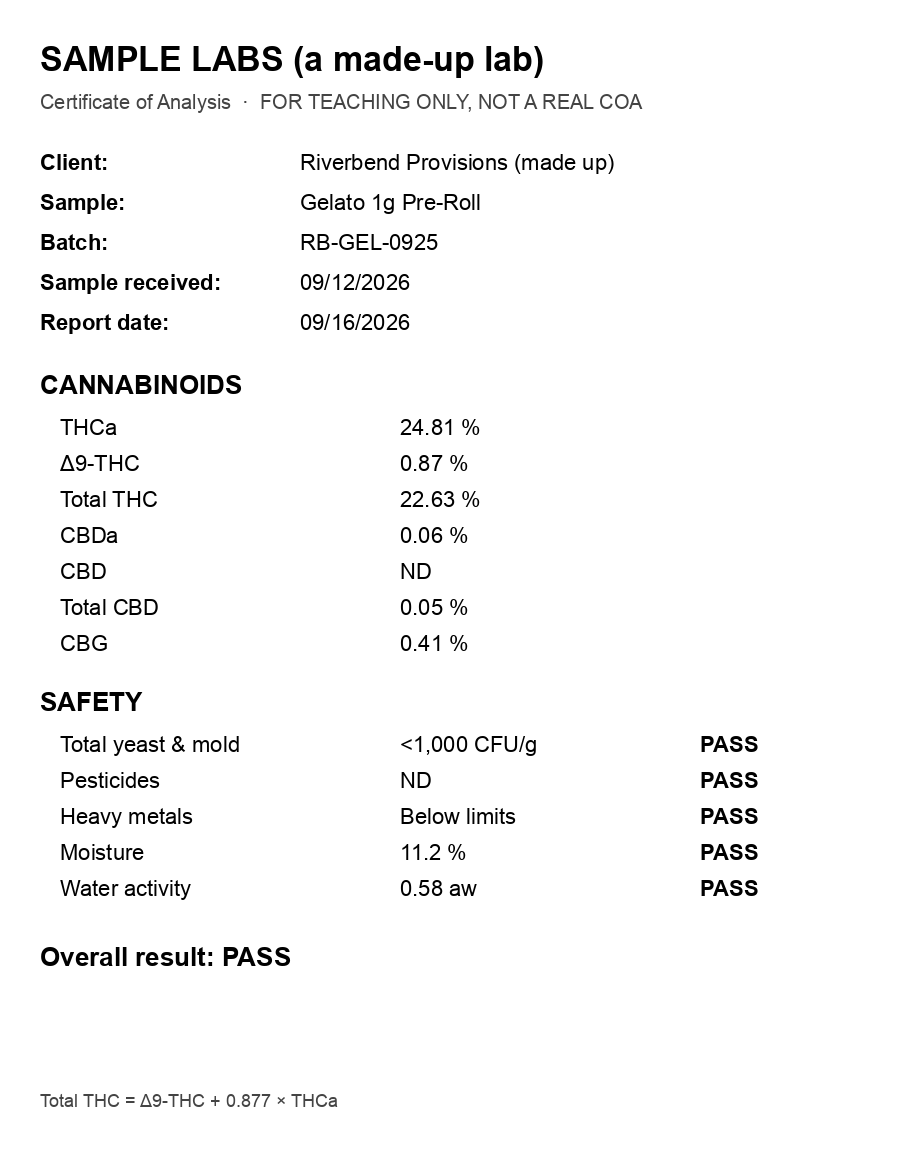
prompt.mdwith abstention,check.py(completeness, total-THC identity, label reconciliation,--self-test), and the real model outputs from our test.A piece of itExampleExample prompt.md: the prompt to paste with the photo. It lets the AI say UNREADABLE instead of guessin… check.py: checks the AI's output: every field present and readable, total THC adds up, label ma… samples/: a made-up COA as a clean photo and a blurry one with glare, the real outputs Claude S…
Download README.mdDownload README.mdREADME.md · 2.2 KB · 8 more files in the pack8 more files in the pack+8
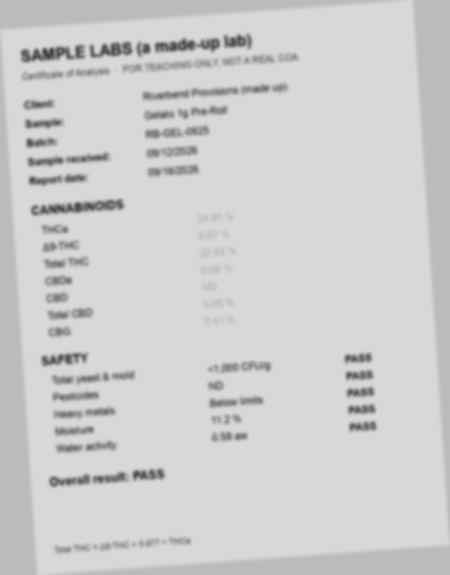
# coa-photo-check version 1.0 · 2026-09-25 · MIT · from Distru's No Bullshit AI Course (module 05, lesson 7). Read a COA from a photo with a vision-capable AI, then check what it read with plain code before anyone uses it. ## Files - `prompt.md`: the prompt to paste with the photo. It lets the AI say UNREADABLE instead of guessing. - `check.py`: checks the AI's output: every field present and readable, total THC adds up, label matches COA. Standard library only. - `samples/`: a made-up COA as a clean photo and a blurry one with glare, the real outputs Claude Sonnet 5 gave for each, and a label to compare against. ## Run ``` python3 check.py --self-test python3 check.py samples/extracted-clean.json samples/label.json # no flags python3 check.py samples/extracted-bad-careful.json samples/label.json # flags the unreadable fields python3 check.py samples/extracted-bad-naive.json samples/label.json # flags the misread numbers ``` ## What the samples show We sent both photos to Claude Sonnet 5 (via OpenRouter, about half a cent a photo), with and without the "use UNREADABLE, never guess" instruction: | | Clean photo | Blurry photo, naive prompt | Blurry photo, careful prompt | |---|---|---|---| | THCa | 24.81 % ✓ | 24.91 ✗ | UNREADABLE | | Total THC | 22.63 % ✓ | 22.53 ✗ | UNREADABLE | | Total CBD | 0.05 % ✓ | 0.41 ✗ (that is the CBG line) | UNREADABLE | | Report date | 09/16/2026 ✓ | 09/16/2025 ✗ | 09/16/2026 ✓ | The naive answer looks perfectly reasonable. `check.py` catches it anyway, because 0.87 + 0.877 × 24.91 is 22.72, not 22.53. ## Before you use it on real COAs - **The best COA is not a photo.** If the lab sends a PDF, a portal link or a QR code, or the results are in your seed-to-sale system, use that. A photo is the fallback. - **It reads; it does not verify.** A clean photo of a forged or wrong-batch COA reads perfectly. Check the batch against your inventory and the lab against your approved list. - **A person decides.** Anything flagged, and anything going onto a label or into Metrc, gets human eyes. - **Check your state's total THC rule.** The 0.877 conversion is standard, but confirm how your state requires total THC to be calculated and reported.The rest of the packThe rest of the packls
- coa-photo-check/check.py · 3.8 KB
- coa-photo-check/prompt.md · 929 B
- coa-photo-check/samples/coa-bad.jpg · 8.9 KB
- coa-photo-check/samples/coa-clean.png · 85 KB
- coa-photo-check/samples/extracted-bad-careful.json · 258 B
- coa-photo-check/samples/extracted-bad-naive.json · 236 B
- coa-photo-check/samples/extracted-clean.json · 244 B
- coa-photo-check/samples/label.json · 107 B